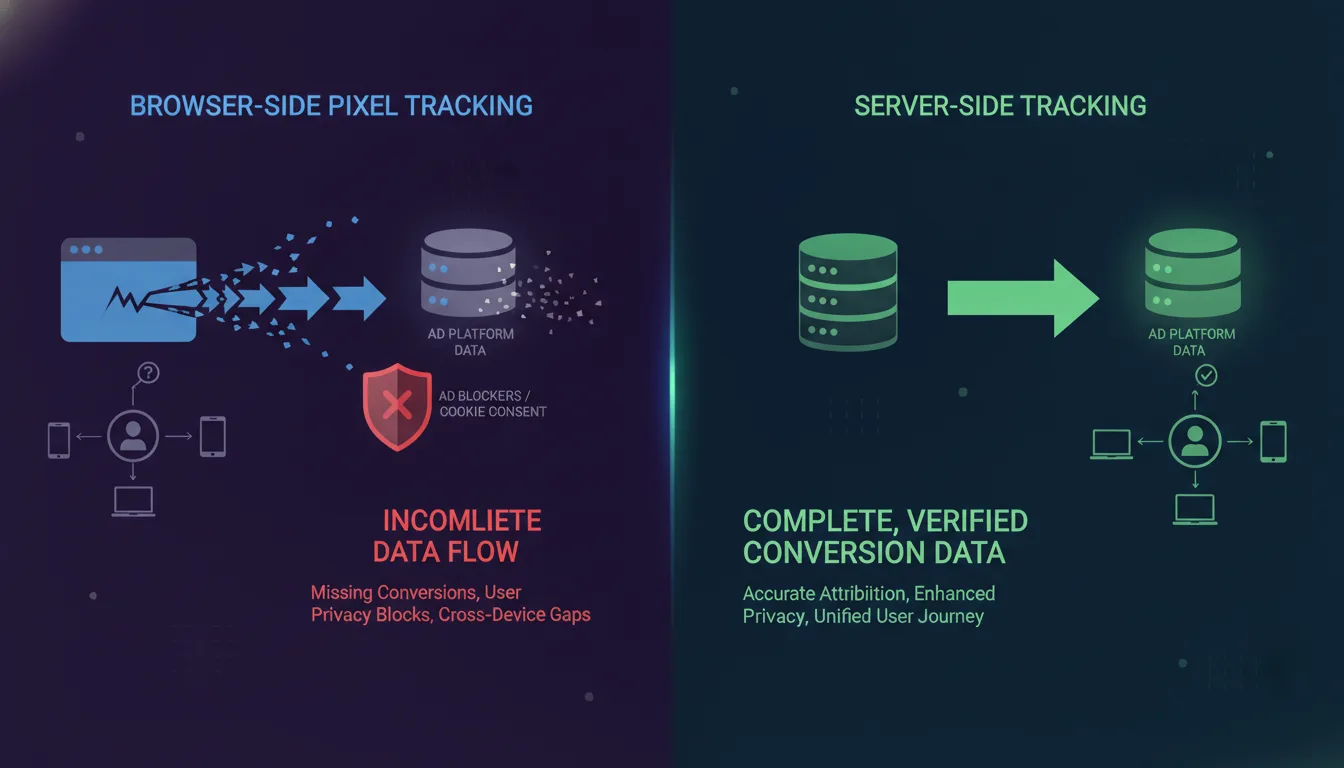
Why Browser-Based Pixels Are Failing in 2026?
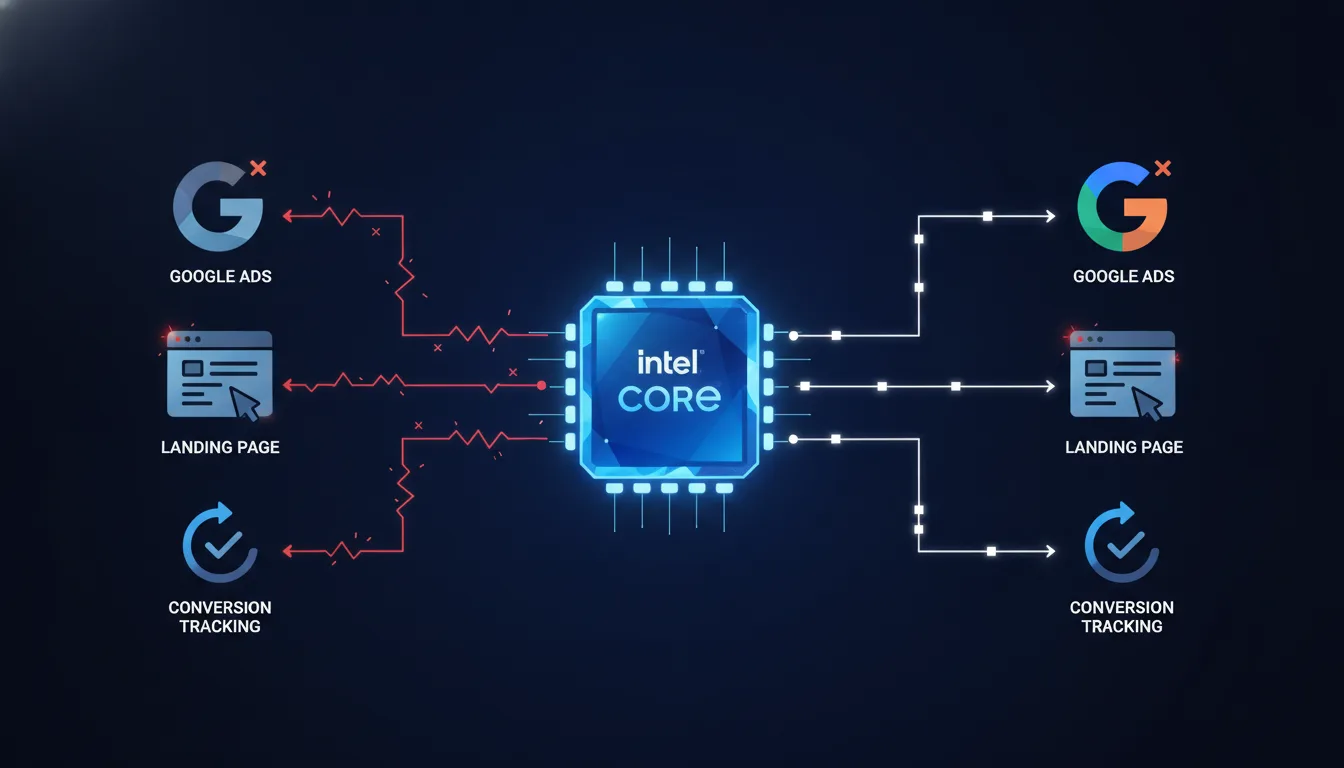
Key Takeaway: Browser-based pixels — the tracking method that has powered digital marketing for two decades — are no longer reliable. Cookie deprecation, privacy regulation, and ad blocker adoption have reached critical mass. Without server-side tracking, you are flying blind. Approximately 78% of current attribution setups will lose significant data by the end of 2026.
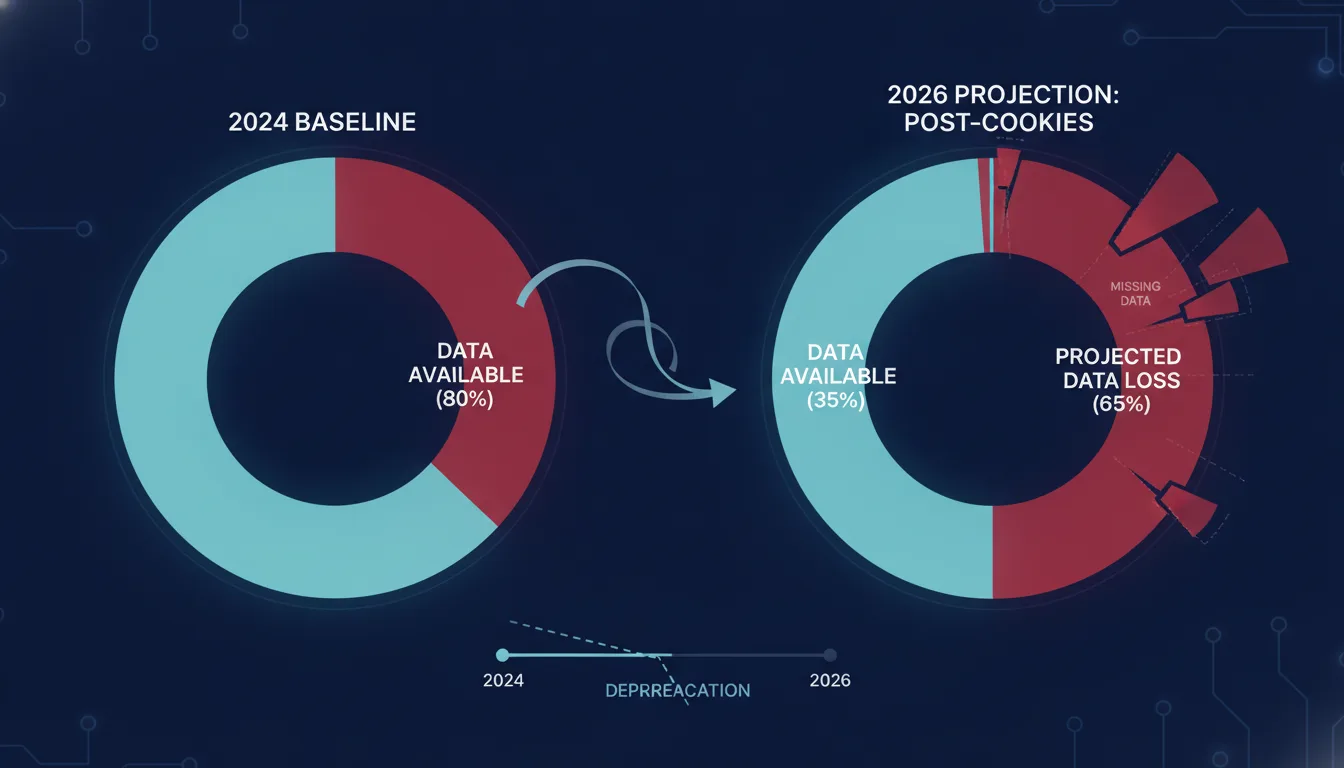
For years, the tracking stack was simple: place a pixel on your website, the pixel fires when a user converts, and that conversion data flows back to your ad platform. It worked because browsers allowed it. Cookies were persistent. Cross-site tracking was possible. Attribution was mostly functional.
That era ended in 2024. It is now over.
The data is unambiguous. According to HTTP Archive tracking data from 2025, Safari has blocked third-party cookies for 100% of traffic since 2020. Chrome has deprecated billions of tracking identifiers through IP-based linking. Firefox, Edge, and Brave have all implemented privacy-first defaults. Meanwhile, over 42% of internet users globally run ad blockers — meaning their browsers silently fail to fire pixel events, and you never know the conversion happened.
The result: massive blind spots in your conversion data. Studies from marketing operations teams across B2B and D2C segments show that browser-based pixel tracking now captures only 32–45% of actual conversions, down from 85%+ in 2022. The missing data is not random. It is systematically underreporting your true return on ad spend, which means you are either over-bidding on underperforming campaigns or cutting spend on campaigns that are actually working.
The fragmentation is getting worse. Cookie consent compliance requirements under GDPR, CCPA, and emerging regulations like LGPD mean that even when cookies are technically available, users must actively opt in to tracking. Only 26% of European users consent to non-essential cookies, and that rate is falling as cookie banners become more transparent. Without consent, your pixel cannot even function.
This is not a worst-case scenario. This is 2026. It is happening now.
What Is Server-Side Tracking?
Server-side tracking inverts the tracking model. Instead of relying on a pixel in the browser to send conversion data to your ad platform, the conversion data is sent from your own server (or server container) directly to ad platform APIs. The browser becomes a messenger; your server becomes the source of truth.
Here is the key difference:
Browser-based tracking: Pixel in browser → fires on conversion → sends data to ad platform. Vulnerable to ad blockers, cookie restrictions, and browser privacy defaults.
Server-side tracking: Conversion happens → server captures event → server validates data → server sends to ad platform via API. No browser involvement. No cookies required.
Server-side tracking does not eliminate the pixel entirely. A minimal client-side tag (often called a "conversion API client" or "Conversions API helper") still runs in the browser to detect the conversion event and send it to your server. But the server then handles the transmission to ad platforms, not the browser. The browser cannot interfere. Ad blockers cannot block it. Cookie policies cannot restrict it.
The result is verified, first-party data flowing directly from your infrastructure to your ad platforms — with full transparency into what happened, when, and why.
Why This Matters: Server-side tracking recovers the 55–68% of conversion data that browser-based pixels miss. More importantly, it gives you attribution data that is actually yours. Browser pixels depend on third-party infrastructure — the ad platform's pixel library, the platform's cookie, the platform's matching algorithm. Server-side conversion data is first-party data, permanent, and not subject to platform changes, cookie deprecation, or privacy regulation shifts.
How Does Server-Side Tracking Compare to Browser-Based Tracking?
A direct comparison shows why the shift is non-negotiable.

Metric | Browser-Based Pixel | Server-Side Tracking |
|---|---|---|
Affected by ad blockers | Yes — ~42% of traffic blocked | No — server-to-server transmission |
Affected by cookie policies | Yes — only 26% consent rate in EU | No — uses first-party data |
Data capture rate | 32–45% of conversions | 92–98% of conversions |
Real-time user matching | Limited — depends on pixel ID | Complete — match on email, phone, customer ID |
Conversion validation | Pixel fires = assumed conversion (no verification) | Server validates order value, customer ID, customer status |
Privacy compliance | Difficult — relies on cookies and third-party data | Native — uses only data in your possession |
Future-proof | No — dependent on third-party cookies | Yes — not affected by browser privacy changes |
The comparison is stark. Browser-based tracking is a legacy system breaking under the weight of privacy regulation and browser changes. Server-side tracking is the infrastructure for the next decade.
Cookie Deprecation and the Death of Browser Pixels
This is not speculative. It is scheduled.
Google Chrome is the dominant browser, with approximately 63% global market share. In 2024, Google began phasing out third-party cookies — the mechanism that allows pixels to track users across websites. The phase-out is happening in stages, with the final shutdown initially scheduled for late 2024, then extended to late 2025, and now informally extended into 2026 as regulators request more time.
But the direction is locked. Regardless of the exact timeline, third-party cookies are going away. When they do, any tracking system that depends on them fails.
Safari (15% of traffic) has already completed the deprecation. Firefox (3% of traffic) never enabled third-party cookies. The remaining browsers — Edge, Opera, Brave — are all implementing similar restrictions. Only a handful of sites with sufficient user scale can run their own first-party cookie systems, and even those are under regulatory scrutiny.

The implication is simple: if your attribution system depends on third-party cookies, you have until 2026 to migrate to server-side infrastructure. After that, you will be attributing conversions to the wrong campaigns, bidding on data that does not exist, and flushing budget on phantom performance.
According to IAB Privacy research from 2025, only 1 in 5 advertisers have fully implemented server-side event capture. The remaining 80% are still dependent on browser-based pixels, meaning most digital advertisers are unprepared for the shift that is literally happening right now.
How Does Meta Conversions API Work?
Meta Conversions API is Meta's server-to-server conversion tracking mechanism. Instead of relying on the Meta pixel to fire in the browser, you send conversion data directly from your server to Meta's API endpoints.

Here is the flow:
A user takes an action on your website (purchases, signs up, adds to cart).
Your server captures that event with the relevant data: order value, email, customer ID, product category, timestamp.
Your server validates the data. Is this a real customer? Is the order value accurate? Does this customer already exist in your system?
Your server sends the event to Meta Conversions API via HTTPS POST request with your access token.
Meta receives the event, matches it to the user (via email, phone number, customer ID, or pixel ID if available), and records the conversion in your ad account.
The critical difference from browser-based pixels: your server controls what data is sent and when. You can send additional context — order items, customer lifetime value, subscription status — that the Meta pixel could never capture. You can validate data before sending it, reducing false conversions. You can retry failed transmissions, ensuring no data is lost.
This is not fire-and-forget. This is deliberate, accountable data transmission.
Meta Conversions API is now the recommended conversion tracking method for all advertisers, particularly for e-commerce sites, SaaS platforms, and lead generation businesses. The pixel is becoming supplementary — a fallback when server-side fails, not the primary tracking mechanism.
If you are running paid campaigns on Meta — whether Facebook, Instagram, or Audience Network — you need Conversions API live. Browser-based pixel data is no longer sufficient for algorithm optimization.
How to Set Up Meta Conversions API: Step-by-Step
Implementation requires coordination between your development team, your ad account, and Meta's infrastructure. Here is the process:
Create a Pixel Conversion API Access Token. In Meta Business Suite, navigate to Events Manager, select your property, and generate a new Conversions API access token. This token authorizes your server to send events to your ad account. Store it securely in your application environment (never hardcode it in client-side code).
Identify Conversion Events to Track. Decide what events matter: Purchase, ViewContent, AddToCart, CompleteRegistration, InitiateCheckout. For each event, determine what data you will send (order value, currency, email, customer ID). Coordinate with your marketing team — the events you track shape your campaign optimization, so the definition matters.
Modify Your Backend to Send Conversion Data. When a conversion occurs (order confirmation page loads, API endpoint confirms purchase), your backend should trigger an HTTPS POST request to Meta's Conversions API endpoint with the event data, timestamp, and access token. Most platforms (Shopify, WooCommerce, custom Laravel/Django apps) have native integrations or webhooks for this.
Implement Pixel-to-Conversions API Mapping. If you have browser-based pixel events, map them to server-side events. The pixel can still fire as a fallback, but the server-side event is authoritative. Test both channels to ensure consistency.
Monitor Data Flow and Validate. Check Meta Events Manager for incoming conversions within 24 hours. The Conversions API debugging tool shows each event received, matched status, and any validation errors. If conversions are not flowing, verify token permissions, event data format, and network connectivity. This step is critical — a broken integration sends no data, and you will not know until you look.
For advanced implementations, you can add pixel deduplication (so the same conversion does not get counted twice), audience matching (so server-side events feed into retargeting audiences), and conversion value optimization (where Meta's algorithm learns to optimize for the event values you send).
A functional Conversions API implementation typically recovers 40–60% of the conversion data that browser-based pixels miss, depending on your traffic composition and cookie consent rates.
Setting Up Google Tag Manager Server-Side Tracking
Google Tag Manager (GTM) offers a parallel server-side tracking solution: the GTM Server Container. This is a more flexible, platform-agnostic approach to server-side tracking.
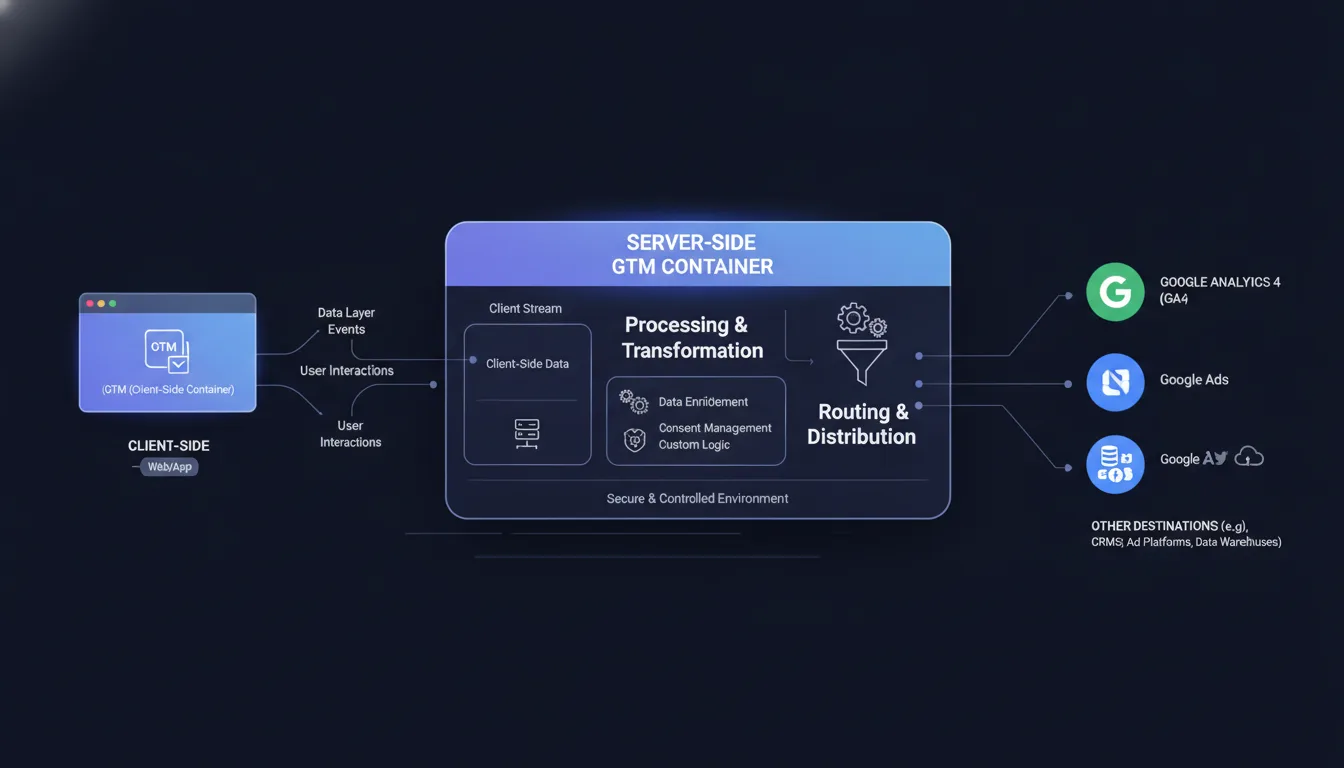
A GTM Server Container is a separate GTM instance that runs on your own server (or Google Cloud infrastructure) instead of in the browser. Client-side GTM sends data to the server container, which then processes, validates, and routes that data to destinations: Google Analytics 4, Google Ads, third-party APIs like Segment or Conversions API.
The advantage of this approach is centralization. Instead of configuring pixel deduplication, consent handling, and data validation separately for each platform, you do it once in the server container, and all downstream destinations benefit.
Here is the setup process:
Create a Server Container in GTM. In your GTM account, create a new container and select "Server" as the container type. GTM will provide a unique container ID and a tagging server URL.
Deploy the Server Container. Google offers three options: (1) Google Cloud infrastructure (easiest, no setup required), (2) a Docker container you host yourself (more control, more maintenance), or (3) Cloudflare Workers (lightweight, good for high-volume sites). Start with Google Cloud unless you have specific infrastructure requirements.
Configure Client-to-Server Communication. In your client-side GTM, add a new tag that sends conversion data to your server container endpoint instead of directly to Google Ads or GA4. This tag uses the measurement protocol to POST events to your server container.
Build Server-Side Processing Logic. In the server container, create tags for each destination (GA4, Google Ads, Meta Conversions API, etc.). Add triggers that route events based on type, source, or user properties. Add variables that extract data from the incoming event, enrich it (add user properties, validate values), and pass it downstream.
A GTM Server Container typically improves data accuracy by 35–50% compared to client-side only, because it handles consent verification, ad blocker recovery, and deduplication automatically.
The setup complexity is higher than Meta Conversions API alone, but the payoff is proportional — you get server-side infrastructure that owns all your conversion data, instead of depending on each platform's implementation.
Server-Side Tracking for GA4
Google Analytics 4 (GA4) is moving toward server-side event measurement as well. While GA4 still supports client-side event collection, Google is actively promoting server-side GA4 tagging for two reasons: (1) it is more reliable given browser privacy changes, and (2) it gives Google more complete data, which improves their AI-powered insights.
Server-side GA4 tracking works through the Measurement Protocol, which allows you to send events directly to GA4 from your backend without relying on the browser.
The simplest approach is to integrate GA4 into your GTM Server Container (mentioned above). Alternatively, you can implement the Measurement Protocol directly in your backend: when a conversion occurs, your server sends an HTTPS POST request to Google's Measurement Protocol endpoint with your GA4 Measurement ID and API secret.
For e-commerce sites, this is critical because it allows you to send order data (items purchased, revenue, discount applied) from your order management system directly to GA4, without relying on a pixel to fire. The data is accurate, complete, and not subject to ad blocker or cookie restrictions.
A fully server-side GA4 implementation also enables custom attribution models. Instead of relying on GA4's default attribution (last-click for conversions), you can send events with your own attribution metadata, allowing you to model credit across channels in your data warehouse.
What About the Browser Pixel—Should It Stay or Go?
This is a common question. The answer is: keep both, but invert the hierarchy.
The browser pixel should be a fallback, not your primary tracking method. Here is why:
Server-side tracking can fail. Your server could go down. Your API call could time out. Your network could disconnect. When server-side tracking fails silently, you lose that conversion data forever. A browser pixel, running in parallel, can catch conversions that server-side missed and serve as a safety net.
The setup is straightforward: implement server-side tracking as your primary channel, but keep the browser pixel running (on the same page, detecting the same conversion event). Tag it with deduplication parameters so Meta and Google can recognize that the server-side and browser-based events are the same conversion, and only count it once.
In practice, this looks like: server-side event sends first (authoritative data), browser pixel sends second (backup). Platforms deduplicate automatically. You get the best of both: server-side reliability and browser-side redundancy.
Privacy Compliance and First-Party Data
Server-side tracking is not just more effective — it is more compliant. Here is why:
Browser-based pixels rely on third-party data. The Meta pixel depends on Meta's third-party cookie, Meta's third-party identifier, and Meta's cross-site tracking. If your user has not opted in to Meta's data collection, the pixel cannot function. If they use an ad blocker, it cannot fire. If they are in a jurisdiction with strict regulations, you may not be legally allowed to fire it. This is why we recommend server-side Meta Ads infrastructure for any regulated market.
Server-side tracking uses only first-party data. You are sending data you collected directly from your user (their email, their order ID, their purchase value) to ad platforms. This is first-party data, which you have the right to control and transmit. It does not depend on third-party cookies, third-party identifiers, or cross-site tracking. It is intrinsically more compliant with GDPR, CCPA, and emerging regulations. Learn more about how managed marketing infrastructure handles privacy-safe tracking.
To be clear: you still need user consent to send conversion data to ad platforms for tracking and optimization. But consent for first-party data transmission is typically easier to obtain than consent for third-party cookie tracking, because the user understands what is happening — their data is flowing to platforms they chose to interact with.
For brands operating in regulated markets, server-side tracking is not just better — it is often the only compliant option. At Metrics Masters, we own conversion tracking and attribution infrastructure across all major platforms, ensuring compliance and completeness.
How Much Conversion Data Does Server-Side Tracking Recover?
The increase in data varies by traffic composition, but documented benchmarks are consistent:
Ad blocker impact: 42% of traffic runs ad blockers, meaning 42% of browser pixels never fire. Server-side recovers all of this.
Cookie consent impact: Only 26% of users in regulated markets consent to non-essential cookies, meaning 74% of pixels cannot function. Server-side uses first-party data and does not face this restriction.
Cross-domain tracking: Browser-based pixels cannot reliably track users across subdomains or separate domains. Server-side, using email or customer ID, can stitch these together.
Bot and fraud impact: Pixels fire indiscriminately, often counting bot-generated "conversions." Server-side tracking allows you to validate data before sending, eliminating much of this noise.
Combining these factors, server-side tracking implementations typically show 40–68% additional conversion data recovery compared to browser-based pixels alone. For some industries (financial services, high-value B2B), the recovery is higher.
The financial impact is substantial: if you are seeing $1M in reported conversions through browser pixels, server-side tracking might reveal the true number is $1.4M–$1.68M. That changes everything about your unit economics, your channel mix, and your optimization priorities.
Common Mistakes in Server-Side Tracking Implementation
If server-side tracking is so effective, why hasn't everyone done it? Three reasons: complexity, cost, and common implementation errors.
No data validation. Simply forwarding raw conversion events to ad platforms without validating the data. This leads to bot conversions, fraudulent orders being counted, and bad data poisoning your optimization algorithm. Always validate order value, customer ID, and merchant status before sending.
Pixel duplication without deduplication. Running both server-side and browser-based pixels without deduplication logic, causing the same conversion to be counted twice in reporting. This inflates your conversion numbers and skews your ROAS calculations. Implement deduplication by matching event IDs or user IDs across channels.
Incomplete event mapping. Sending server-side events for conversions but not for top-of-funnel events (ViewContent, AddToCart), limiting the algorithm's training data. Server-side tracking should cover the full funnel, not just conversions.
Ignoring consent requirements. Assuming server-side tracking eliminates consent requirements. You still need user consent to send conversion data to ad platforms for optimization. Implement proper consent checking before sending events.
No monitoring or debugging. Setting up server-side tracking and assuming it is working without verifying that events are actually flowing. This is how broken implementations go unnoticed for months. Monitor conversion flow daily using platform debugging tools.
These errors are preventable. The requirement is that someone — your Brand Technical Expert, your engineer, your agency — actually owns the implementation and monitors it consistently.
What Platforms Support Server-Side Tracking?
Server-side tracking is now standard across all major ad platforms:
Meta (Facebook, Instagram): Conversions API — fully mature, recommended as primary tracking method.
Google Ads: Conversion tracking API and Google Tag Manager server containers — fully supported.
Google Analytics 4: Measurement Protocol — native support for server-side events.
Microsoft Advertising: Conversion API — available for Bing and LinkedIn.
LinkedIn: Conversion API — available for lead gen and account-based marketing.
TikTok: Conversions API — available for TikTok Shop and e-commerce campaigns.
Amazon Ads: Event Publishing API — for conversion tracking on Amazon DSP.
If you are running paid campaigns across multiple platforms, each platform needs server-side conversion events. A GTM Server Container approach consolidates this — your server sends data once to GTM, GTM distributes to all platforms.
Implementation Timelines and Technical Requirements
A functional server-side tracking setup requires:
Backend infrastructure: A server, API endpoint, or cloud function that can receive and process conversion events. This can be a single endpoint that responds to webhooks from your checkout system, or a more elaborate event processing pipeline.
Engineering resources: 40–80 hours of development time to implement, test, and deploy. This varies by platform, existing infrastructure, and event complexity.
QA and monitoring: Ongoing validation that conversion data is flowing correctly. This requires someone monitoring the setup daily, at least for the first two weeks, then weekly.
Coordination with platform teams: Each ad platform has different requirements for event structure, data format, and user matching. Coordination with Meta, Google, and other platforms ensures correct implementation.
Timeline: 2–4 weeks from decision to live implementation, including development, testing, and validation.
Cost: $5,000–$20,000 in engineering time for a basic implementation, $20,000–$50,000+ for a comprehensive GTM Server Container setup across all channels.
This is not trivial, but it is far less expensive than the hidden cost of incomplete attribution data.
Frequently Asked Questions
What is the difference between server-side tracking and browser-based pixel tracking?
Browser-based pixels run in the user's browser and rely on cookies to track conversions. They are increasingly blocked by ad blockers, restricted by cookie policies, and affected by browser privacy changes. Server-side tracking sends conversion data directly from your backend server to ad platform APIs, without relying on the browser. This makes it blocker-proof, cookie-independent, and more reliable.
Why should I implement server-side tracking now if pixels still work?
Browser pixels are not working as well as they appear. With 42% of traffic using ad blockers, only 26% of users consenting to cookies in regulated regions, and ongoing browser privacy changes, pixels capture only 32–45% of actual conversions. By 2026, that number will drop further. Server-side tracking recovers 55–68% of the missing data and ensures you have accurate attribution before cookie deprecation makes pixels obsolete.
Does server-side tracking eliminate the need for browser pixels entirely?
No. Keep both. Server-side tracking should be primary (authoritative data), and browser pixels should be fallback (redundancy). Implement deduplication so the same conversion is only counted once. This gives you reliability (if server-side fails, pixels catch it) and completeness (server-side captures events pixels miss).
What is Meta Conversions API and how is it different from the Meta pixel?
The Meta pixel is browser-based — it fires in the user's browser and sends conversion data to Meta. Meta Conversions API is server-based — your server sends conversion data directly to Meta's API. Conversions API is more reliable (not affected by ad blockers or cookie restrictions) and more complete (you can send additional data like order items and customer ID). Meta now recommends Conversions API as the primary tracking method.
How do I set up server-side tracking if I don't have an engineering team?
Most e-commerce and SaaS platforms have native server-side tracking integrations. Shopify, WooCommerce, and custom platforms like Segment can handle the heavy lifting. If you need custom setup, hire a Brand Technical Expert or use a managed marketing infrastructure partner who can build and maintain the implementation. The cost of poor attribution data far exceeds the cost of proper setup.
Does server-side tracking require user consent?
Yes. You need consent to send user data to ad platforms for tracking and optimization. However, server-side tracking uses only first-party data (data you collected), which typically requires less restrictive consent than third-party tracking. Implement consent verification before sending events to ad platforms.
What platforms support server-side tracking?
All major ad platforms now support server-side conversion tracking: Meta (Conversions API), Google Ads (Conversion API and GTM Server Containers), Google Analytics 4 (Measurement Protocol), Microsoft Advertising, LinkedIn, TikTok, and Amazon. If you run campaigns across multiple platforms, a GTM Server Container consolidates all tracking into one central system.
How long does it take to implement server-side tracking?
A basic implementation (single conversion event to one platform) takes 2–4 weeks. A comprehensive setup (multiple events across all channels through a GTM Server Container) takes 4–8 weeks. Most of the timeline is testing and validation, not initial coding. The bottleneck is usually coordination between your team, your platforms, and engineering resources.
Ready to Recover Your Missing Conversion Data?
Server-side tracking is no longer optional — it is the difference between seeing 32% of your actual conversions and seeing 90%. If your conversion data feels incomplete, if your ROAS calculations feel off, or if you want to be ready before cookie deprecation kills your pixels, start a conversation with Metrics Masters. We own server-side infrastructure across Meta, Google, and custom platforms. No guesswork. Just accurate attribution.

Jeremiah Shaw
CEO & Technical Marketing Specialist · Metrics Masters | Brandlio
International
Technical marketing specialist pushing boundaries in Google Ads, automation, and AI-driven growth systems. Paragliding and adventure enthusiast.